MAC OS Firmware Installation Guide
- Download the ZIP firmware file. (Get it from the download below)

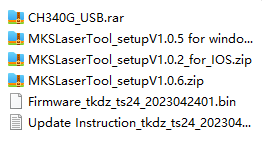
- Unzip below file and Install the drive file.

- Unzip below file and Install the firmware burning software.

- Turn on the Spider M1, and connect it with computer by below Type B USB cable.

- Open MKS Laser Tool V1.0.6

- Choose MKS ESP32 Download Tooland confirm the right COM port.

- Click Startto burn the firmware.

- Finished the burning of the firmware

- Plug out the USB cable and restart Spider M1.
点赞
Resource download address
该资源需登录后下载
去登录Warm reminder: This resource comes from the Internet and is for reference only. If this resource infringes your rights, please contact us for processing.



Comment List(12)
Virgilio Zambarano
2024.3.25 14:03
Excellent write-up
Doug Moser
2024.2.6 11:02
Excellent write-up
Paul Ercolani
2024.1.31 08:01
Outstanding feature