Easy Connectivity! Spider Laser Machine Tutorial: Connecting to LightBurn via WIFI
I am thrilled to share some exciting news with all of you through this post: our Spider Laser machine can now be connected to LightBurn software using WIFI! This tutorial will guide you on how to combine these two powerful tools, unleashing your creativity.
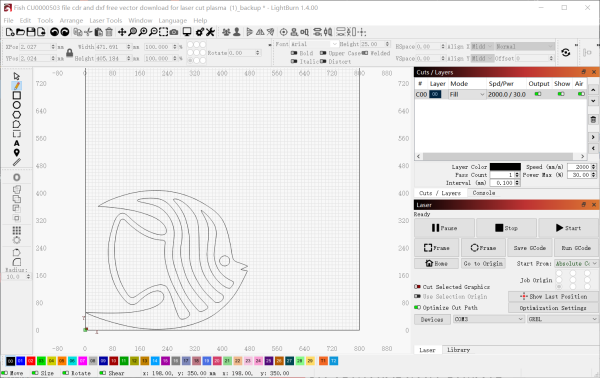
In traditional methods, we had to connect our computer to the laser engraving machine using a USB cable. However, with WIFI connectivity, we can now break free from the constraints of cables and work with greater freedom and convenience for laser engraving and cutting. Let’s explore this brand new connection method together!
Tutorial Overview: Next, I will provide step-by-step instructions on how to connect your Spider Laser machine and LightBurn software using WIFI:
1. Connect the device to WiFi and obtain the device’s IP address. Ensure that the PC is on the same network as the device.
2. Open LightBurn and click on “Devices,” then click on “Create Manually.”

3. Select “GRBL” and click “Next.”

4. Choose “Ethernet/TCP” and click “Next.”

5. Enter the port number and click “Next.”

6. Name the device and set the working area dimensions according to the actual settings. Click “Next.”

7. Set the origin to the bottom left corner and disable the auto home function.

8. Click “Finish.”

9. Click “Edit” on the top menu, then click “Device Settings.”

10. Set Network Port to 8080, change Transfer Mode to Synchronous, and click OK.

11. Switch to the Console tab on the right side to see the message “Waiting for connection…”

12. Click “Devices,” then click “OK.”

13. The Console tab on the right side will show the connection process and eventually display “OK” once successfully connected.

14. Since LightBurn requires real-time data transmission when connected to the device, ensure that the PC and the device maintain a stable network connection during operation.


Comment List(167)
Anaiz
2024.3.28 00:03
Wow, superb blog layout! How long have you been blogging for?
you make blogging look easy. The overall look of your web site is great, let alone the content!
Eliana
2024.3.28 00:03
An interesting discussion is definitely worth comment. There’s no doubt that that you
should write more about this subject matter, it might not be a taboo matter but usually people don’t speak about such subjects.
To the next! Cheers!!
Shiv
2024.3.28 00:03
Hello everyone, it’s my first pay a visit at this site, and piece of writing is truly fruitful for me, keep up posting these types of articles
or reviews.